GateKeeper1.9
Publisher Description
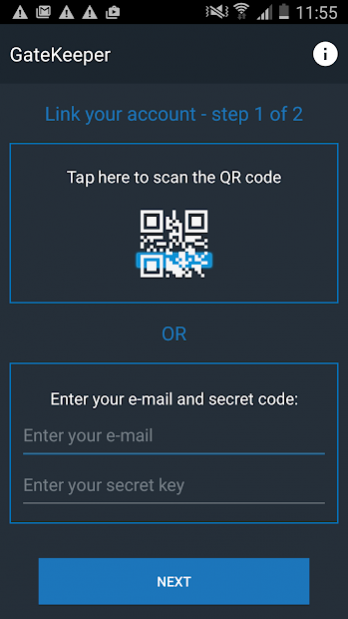
Stay safe with the GateKeeper Authentication method and add an extra security to your Account.
If you enable the GateKeeper authentication method, you will log into your accounts with a special one-time confirmation code generated from this app. The generate codes are unique for each of your accounts and constantly changing.
With GateKeeper you can control multiple accounts.
How does GateKeeper work?
In order to work GateKeeper should be linked to the Account you want to secure.
Turn on the GateKeeper authentication method from your Account Profile page and follow the instructions there.
It is quick and easy and will take you less than a minute to link your account with the GateKeeper app.
The app will generate authentication codes that will be required for account log-in or payments confirmation.
App features:
*QR code scanning for quick and easy set up
*Generating unique codes for authentication
*4 or 6-digit passcode to unlock
Add an extra layer of security!
Download GateKeeper now!
About GateKeeper
The company that develops GateKeeper is iCard Services AD. The latest version released by its developer is 1.9. This app was rated by 2 users of our site and has an average rating of 5.0.
To install GateKeeper on your Android device, just click the green Continue To App button above to start the installation process. The app is listed on our website since 2019-02-08 and was downloaded 8 times. We have already checked if the download link is safe, however for your own protection we recommend that you scan the downloaded app with your antivirus. Your antivirus may detect the GateKeeper as malware as malware if the download link to ipay.gatekeeper.gate.keeper is broken.
How to install GateKeeper on your Android device:
- Click on the Continue To App button on our website. This will redirect you to Google Play.
- Once the GateKeeper is shown in the Google Play listing of your Android device, you can start its download and installation. Tap on the Install button located below the search bar and to the right of the app icon.
- A pop-up window with the permissions required by GateKeeper will be shown. Click on Accept to continue the process.
- GateKeeper will be downloaded onto your device, displaying a progress. Once the download completes, the installation will start and you'll get a notification after the installation is finished.
Program Details
System requirements
Download information
Pricing
Version History
version 1.9
posted on 2019-02-08
Improvements
